
In 4 simple and easy to follow steps:
Step 1: Getting Psion Resources
You will have to register to get access to the page.
(https://teknet.psionteklogix.com/ptxCMS/Teknet.aspx?s=us&p=DevKits)
Download and install their "Mobile Devices SDK"
Step 2: Create Project
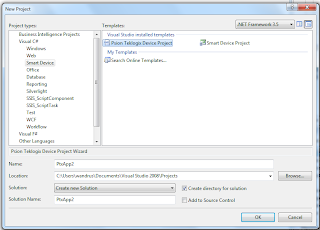
If you go to the "Smart Device" section, you will notices a "Psion Teklogix Device Project". This add the Psion TeklogixNet reference and also the PtxSdkCommon.dll in the root directory, which is a dependency when running your app on device.
Step 3: Add Items to the Toolbar, if needed
Right-click on the Toolbar, and select Choose Items.
Browse to C:\Program Files\Psion Teklogix\Mobile Devices SDK V3.1\DotNet2 and select the PsionTeklogixNet.dll
This should add:
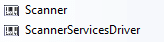
If not already done so, drag each of those items onto the form.
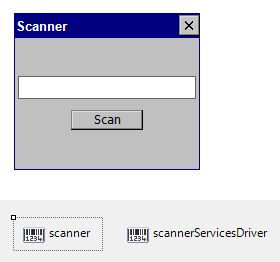
The default app gives a good example, it uses the ScanCompleteEvent; which send in a string value representation of the barcode and places it text into a textbox for the user to see.
P.S.
The size of the form shouldn't be bigger than 245 x 300
Step 1: Getting Psion Resources
You will have to register to get access to the page.
(https://teknet.psionteklogix.com/ptxCMS/Teknet.aspx?s=us&p=DevKits)
Download and install their "Mobile Devices SDK"
Step 2: Create Project
If you go to the "Smart Device" section, you will notices a "Psion Teklogix Device Project". This add the Psion TeklogixNet reference and also the PtxSdkCommon.dll in the root directory, which is a dependency when running your app on device.

Step 3: Add Items to the Toolbar, if needed
Right-click on the Toolbar, and select Choose Items.
Browse to C:\Program Files\Psion Teklogix\Mobile Devices SDK V3.1\DotNet2 and select the PsionTeklogixNet.dll
This should add:

If not already done so, drag each of those items onto the form.

The default app gives a good example, it uses the ScanCompleteEvent; which send in a string value representation of the barcode and places it text into a textbox for the user to see.
Step 4: Deploying
Code Snippet
- /* $Revision 1.1.1.1 */
- /* Copyright Psion Teklogix Inc. 2007 */
- /*
- * File: Form1.cs
- *
- * Description:
- * Implementation file for Form1 class in PtxApp1
- *
- */
- using System;
- using System.Collections;
- using System.Collections.Generic;
- using System.ComponentModel;
- using System.Data;
- using System.Drawing;
- using System.Runtime.InteropServices;
- using System.Text;
- using System.Windows.Forms;
- using PsionTeklogix.Barcode;
- using PsionTeklogix.Barcode.ScannerServices;
- /*! <summary>
- Contains the class and functions related to PtxApp1 scanner application
- </summary>
- */
- namespace PtxApp1
- {
- /*
- * Form1
- *
- */
- /// <summary>
- /// The Form1 class generates the Graphical User Interface for PtxApp1.
- /// </summary>
- public partial class Form1 : Form
- {
- /*
- * InitializeScanner
- *
- */
- /// <summary>
- /// Initialize components for PtxApp1.
- /// </summary>
- private void InitializeScanner()
- {
- scanner.Driver = scannerServicesDriver;
- scanner.ScanCompleteEvent += new ScanCompleteEventHandler(scanner_ScanCompleteEvent);
- }
- /*
- * Form1
- *
- */
- /// <summary>
- /// Required for Windows Form designer support.
- /// </summary>
- public Form1()
- {
- try
- {
- InitializeComponent();
- InitializeScanner();
- }
- catch (Exception ex)
- {
- MessageBox.Show("Failed to initialize component: " + ex.ToString());
- this.Close();
- }
- }
- /*
- * Button1_Click
- *
- */
- /// <summary>
- /// This method is called when the scan button is clicked and will scan the
- /// barcode.
- /// </summary>b
- /// <param name="sender">
- /// The calling object that represents the user that sent the message.
- /// </param>
- /// <param name="e">
- /// Contains event data of the Scan Button control
- /// </param>
- private void button1_Click(object sender, EventArgs e)
- {
- try
- {
- scanner.Scan();
- }
- catch (Exception ex)
- {
- MessageBox.Show("Scan error: " + ex.ToString());
- this.Close();
- }
- }
- /*
- * Scanner1_ScanCompleteEvent
- *
- */
- /// <summary>
- /// This method is called when the scan complete event occurs. The method is
- /// called by its respective handler and then displays a text representation
- /// of the barcode on the display.
- /// </summary>
- /// <param name="sender">
- /// The calling object that represents the user that sent the message.
- /// </param>
- /// <param name="e">
- /// Contains event data once the scan is complete
- /// </param>
- delegate void scanner_ScanCompleteDelegate(object sender, ScanCompleteEventArgs e);
- private void scanner_ScanCompleteEvent(object sender, ScanCompleteEventArgs e)
- {
- if (!InvokeRequired)
- {
- textBox1.Text = e.Text;
- }
- else
- {
- Invoke(new scanner_ScanCompleteDelegate(scanner_ScanCompleteEvent),
- new object[] { sender, e });
- }
- }
- }
- }
When deploying, remember to set the device to PtxPxa27c: ARMV4I_Release
P.S.
The size of the form shouldn't be bigger than 245 x 300

