
Found this on Wikipedia: http://en.wikipedia.org/wiki/Langton's_ant about Langton's Ant. Using this as a intro to typescript, would be great. It's a very simple algorithm:
At a white square, turn 90° right, flip the color of the square, move forward one unit
At a black square, turn 90° left, flip the color of the square, move forward one unit

Looking at the wiki, it seems if I had a few more rules and colors I can up with different, and interesting patterns.
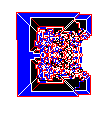
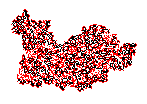
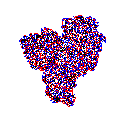
Edit: Some more pics I created by changing pattern and colors:


Typescript:
Code Snippet
- class Point {
- constructor(public X: number,public Y: number) {
- }
- }
- enum Color {
- WHITE,
- BLACK
- }
- enum Direction {
- NORTH,
- EAST,
- SOUTH,
- WEST
- }
- class Ant{
- orientation: Direction;
- precision: number;
- constructor(public location: Point, precision: number, orientation:Direction = Direction.NORTH) {
- this.orientation = orientation;
- this.precision = precision;
- }
- Move() {
- var canvas = <HTMLCanvasElement> document.getElementById("myCanvas");
- var ctx = canvas.getContext('2d');
- var imgData = ctx.getImageData(this.location.X, this.location.Y, this.precision, this.precision);
- var pix = imgData.data;
- var color: Color;
- if (pix[0] == 255 && pix[1] == 255 && pix[2] == 255) { //White
- color = Color.WHITE;
- }
- else {
- color = Color.BLACK;
- }
- if (color == 0) {
- //Change Color
- ctx.fillStyle = "Black";
- ctx.fillRect(this.location.X, this.location.Y, this.precision, this.precision);
- //rotate 90 to right
- if (this.orientation < 3) {
- this.orientation = this.orientation + 1;
- }
- else {
- this.orientation = 0;
- }
- }
- else {
- //Change Color
- ctx.fillStyle = "White";
- ctx.fillRect(this.location.X, this.location.Y, this.precision, this.precision);
- //rotate 90 to left
- if (this.orientation > 0) {
- this.orientation = this.orientation - 1;
- }
- else {
- this.orientation = 3;
- }
- }
- //move forward one unit
- switch (this.orientation) {
- case 0: //North
- this.location = new Point(this.location.X, this.location.Y - this.precision);
- break;
- case 1: //East
- this.location = new Point(this.location.X + this.precision, this.location.Y);
- break;
- case 2: //South
- this.location = new Point(this.location.X, this.location.Y + this.precision);
- break;
- case 3: //West
- this.location = new Point(this.location.X - this.precision, this.location.Y);
- break;
- }
- }
- }
- window.onload = () => {
- var ant = new Ant(new Point(100, 100), 2, Direction.NORTH);
- for (var i = 0; i < 11000; i++) {
- ant.Move();
- }
- };
How it's converted to JavaScript:
Code Snippet
- var Point = (function () {
- function Point(X, Y) {
- this.X = X;
- this.Y = Y;
- }
- return Point;
- })();
- var Color;
- (function (Color) {
- Color._map = [];
- Color._map[0] = "WHITE";
- Color.WHITE = 0;
- Color._map[1] = "BLACK";
- Color.BLACK = 1;
- })(Color || (Color = {}));
- var Direction;
- (function (Direction) {
- Direction._map = [];
- Direction._map[0] = "NORTH";
- Direction.NORTH = 0;
- Direction._map[1] = "EAST";
- Direction.EAST = 1;
- Direction._map[2] = "SOUTH";
- Direction.SOUTH = 2;
- Direction._map[3] = "WEST";
- Direction.WEST = 3;
- })(Direction || (Direction = {}));
- var Ant = (function () {
- function Ant(location, precision, orientation) {
- if (typeof orientation === "undefined") { orientation = Direction.NORTH; }
- this.location = location;
- this.orientation = orientation;
- this.precision = precision;
- }
- Ant.prototype.Move = function () {
- var canvas = document.getElementById("myCanvas");
- var ctx = canvas.getContext('2d');
- var imgData = ctx.getImageData(this.location.X, this.location.Y, this.precision, this.precision);
- var pix = imgData.data;
- var color;
- if(pix[0] == 255 && pix[1] == 255 && pix[2] == 255) {
- //White
- color = Color.WHITE;
- } else {
- color = Color.BLACK;
- }
- if(color == 0) {
- //Change Color
- ctx.fillStyle = "Black";
- ctx.fillRect(this.location.X, this.location.Y, this.precision, this.precision);
- //rotate 90 to right
- if(this.orientation < 3) {
- this.orientation = this.orientation + 1;
- } else {
- this.orientation = 0;
- }
- } else {
- //Change Color
- ctx.fillStyle = "White";
- ctx.fillRect(this.location.X, this.location.Y, this.precision, this.precision);
- //rotate 90 to left
- if(this.orientation > 0) {
- this.orientation = this.orientation - 1;
- } else {
- this.orientation = 3;
- }
- }
- //move forward one unit
- switch(this.orientation) {
- case 0:
- //North
- this.location = new Point(this.location.X, this.location.Y - this.precision);
- break;
- case 1:
- //East
- this.location = new Point(this.location.X + this.precision, this.location.Y);
- break;
- case 2:
- //South
- this.location = new Point(this.location.X, this.location.Y + this.precision);
- break;
- case 3:
- //West
- this.location = new Point(this.location.X - this.precision, this.location.Y);
- break;
- }
- };
- return Ant;
- })();
- window.onload = function () {
- var ant = new Ant(new Point(100, 100), 2, Direction.NORTH);
- for(var i = 0; i < 11000; i++) {
- ant.Move();
- }
- };
Resulting:
Looking at the wiki, it seems if I had a few more rules and colors I can up with different, and interesting patterns.
Edit: Some more pics I created by changing pattern and colors:

