About Me

My photo
Northglenn, Colorado, United States
I'm primarily a BI Developer on the Microsoft stack. I do sometimes touch upon other Microsoft stacks ( web development, application development, and sql server development).
Showing posts with label Error. Show all posts

Tuesday, February 04, 2014

SSRS Report Width Limit Error

Well, you can filed this error in the "probably won't ever happen to me" section, but this happen to me today. In SSRS there is a Width limit of 455 inches for the report section.

The error:

The value of the Width property for the report section 'ReportSection0' is "476.32297in", which is out of range. It must be between 0in and 455in.


This report, that I'm creating is very unique, in that the user can select from a list of views, and then select fields from those views. The report lists out all the fields, but only displays the selected fields. It's an interesting concept of allowing the user to access data via SSRS, mainly since the department isn't allowed to have cubes, data marts, etc... this ends up being the best solution, for now. 

Friday, March 29, 2013

Excel Error in SSIS - 64bit runtime error

Running a very simple SSIS 2012; which pulls data from an excel file. I've done this a million times, but all of a sudden I ran into this tidbit when running on a new machine:

Errors:


  • [Excel Source [39]] Error: SSIS Error Code DTS_E_CANNOTACQUIRECONNECTIONFROMCONNECTIONMANAGER.  The AcquireConnection method call to the connection manager "Excel Connection Manager" failed with error code 0xC0209303.  There may be error messages posted before this with more information on why the AcquireConnection method call failed.
  • [SSIS.Pipeline] Error: Excel Source failed validation and returned error code 0xC020801C.
  • [SSIS.Pipeline] Error: One or more component failed validation.
  • Error: There were errors during task validation.
  • [Connection manager "Excel Connection Manager"] Error: The requested OLE DB provider Microsoft.Jet.OLEDB.4.0 is not registered. If the 64-bit driver is not installed, run the package in 32-bit mode. Error code: 0x00000000.
    An OLE DB record is available.  Source: "Microsoft OLE DB Service Components"  Hresult: 0x80040154  Description: "Class not registered".


On the blogs, people say to download the 64-bit version of the drivers at: http://www.microsoft.com/en-us/download/details.aspx?id=13255
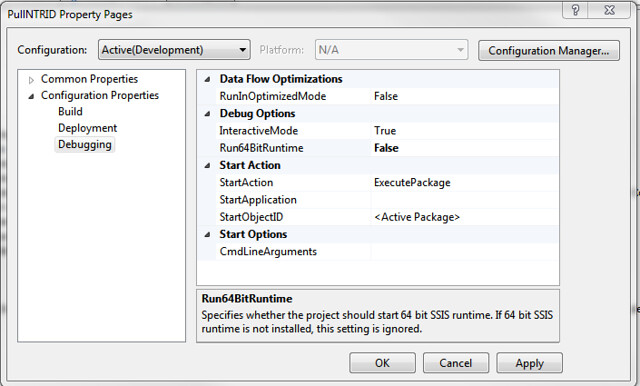
I still had trouble getting it to work, so I changed it to run "not" in 64-bit. Just go to Project/[Name of Project] Properties/Configuration Properties/Debugging under Debug Options and change "Run64BitRuntime" from default value of true to false.


This also means, if you are going to run it in 32-bit, you also have to tell the SQL Agent to run in 32-bit as well. Edit your job and then edit the right job step. Go to the Execution Options pane and check "Use 32 bit runtime". This property will only effect the package (+child packages) called in this job step.

Friday, October 14, 2011

WCF & Silverlight max buffer size issue

Ran into these problems a few times with the WCF errors, in which the buffer size was the issue:
  • “The remote server returned an error: NotFound”
  • "Unable to read data from the transport connection: The connection was closed"
  • "The maximum message size quota for incoming messages (65536) has been exceeded. To increase the quota, use the MaxReceivedMessageSize property on the appropriate binding element."
This would be an easy solution if only dealing with the WCF. Since, we are using the WCF layer to pass data to/from the Silverlight layer the problem arises in two locations -- not one.

Over at Mehroz's Experiments (http://smehrozalam.wordpress.com/2009/01/29/retrieving-huge-amount-of-data-from-wcf-service-in-silverlight-application/) he goes into good detail on solving this problem.

So in the Silverlight's ServiceReferences.ClientConfig we increase the buffer size.

Code Snippet
 <binding name="BasicHttpBinding_IScientificDataService"   closeTimeout="00:01:00"openTimeout="00:01:00" receiveTimeout="00:10:00" sendTimeout="00:01:00" maxBufferSize="2147483647" maxReceivedMessageSize="2147483647" textEncoding="utf-8" transferMode="Buffered">
    <security mode="None"/>
binding>


In the WCF's Web.config, we needed to increase the maxBufferSize and maxReceivedMessageSize to a larger number


Code Snippet
  <system.serviceModel>
    <behaviors>
      <serviceBehaviors>
        <behavior>
          <serviceMetadata httpGetEnabled="true" />
          <serviceDebug includeExceptionDetailInFaults="true" />
          <dataContractSerializer maxItemsInObjectGraph="2147483647"/>
        behavior>
      serviceBehaviors>
    behaviors>
    <serviceHostingEnvironment multipleSiteBindingsEnabled="true" aspNetCompatibilityEnabled="false" />
  system.serviceModel>

Thursday, October 05, 2006

BTS 2002 to BTS 2004 Migration: Error about a user('null')

I was having trouble using VS 2003 Migration wizard to authenicate to a remote server. Of course I had to VPN into the domain. The problem I was getting after entering the server and database name, was an error stating that I could not connect because the username was null. The VS was suppose to use my credential for the connection. Solving the problem was done by going to the Control Panel > Stored User Names and Passwords. Add a connection with my username@domain and password. This got me in.