About Me

My photo
Northglenn, Colorado, United States
I'm primarily a BI Developer on the Microsoft stack. I do sometimes touch upon other Microsoft stacks ( web development, application development, and sql server development).
Showing posts with label fractal. Show all posts

Friday, February 08, 2013

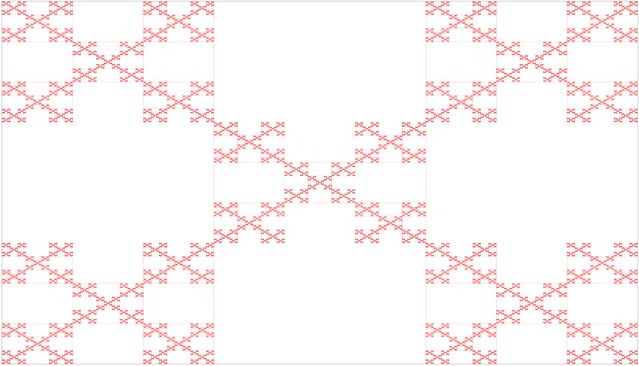
Box Fractal written in Javascript


Code Snippet
  1. <!DOCTYPE html>
  2. <html>
  3. <head>
  4.     <meta charset="utf-8" />
  5.     <meta name="viewport" content="width=device-width" />
  6.     <title>Box Fractal</title>
  7.     <link href="/Content/site.css" rel="stylesheet"/>
  8.  
  9.     <script src="/Scripts/modernizr-2.5.3.js"></script>
  10.     
  11.     <script src="/Scripts/jquery-1.7.1.js"></script>
  12.  
  13.     
  14. </head>
  15. <body>
  16.     
  17.  
  18. <h2>Box Fractal</h2>
  19.  
  20. <canvas id="myCanvas" width="1600px" height="1200px"  style="border:1px solid #d3d3d3;">
  21. Your browser does not support the HTML5 canvas tag.
  22. </canvas>
  23.  
  24. <script type="text/javascript">
  25.     function Point(X,Y) {
  26.         this.X = X;
  27.         this.Y = Y;
  28.     };
  29.  
  30.     function resizeFrame() {
  31.         var h = $(window).height();
  32.         var w = $(window).width();
  33.         $("#myCanvas").css('height', h - 100);
  34.         $("#myCanvas").css('width', w - 50);
  35.     }
  36.  
  37.     function canvas() {
  38.         this.height = $(window).height();
  39.         this.width = $(window).width();
  40.     }
  41.  
  42.     $(document).ready(function () {
  43.         jQuery.event.add(window, "load", resizeFrame);
  44.         jQuery.event.add(window, "resize", resizeFrame);
  45.  
  46.         var color = "red";
  47.         var backgroundColor = "white";
  48.         var lineWidth = 1;
  49.         var precision = 1;
  50.         var third = 0.333333;
  51.  
  52.         var g = document.getElementById("myCanvas");
  53.         var ctx = g.getContext("2d");
  54.         width = g.width;
  55.         height = g.height;
  56.         ctx.fillStyle = color;
  57.         ctx.lineWidth = lineWidth;
  58.  
  59.         //ctx.beginPath();
  60.         draw(width, height);
  61.         //ctx.stroke();
  62.  
  63.         function draw(width, height) {
  64.             //Draw initial block
  65.             var upperLeft = new Point(0, 0);
  66.             ctx.fillRect(upperLeft.X, upperLeft.Y, width, height);
  67.  
  68.             ctx.fillStyle = backgroundColor;
  69.             drawBox(upperLeft, width, height);
  70.         }
  71.  
  72.         function drawBox(upperLeft, width, height) {
  73.             if (width * third > precision) {
  74.                 var top = new Point(upperLeft.X + width * third, upperLeft.Y);
  75.                 var left = new Point(upperLeft.X, upperLeft.Y + height * third);
  76.                 var right = new Point(upperLeft.X + 2 * width * third, upperLeft.Y + height * third);
  77.                 var bottom = new Point(upperLeft.X + width * third, upperLeft.Y + 2 * height * third);
  78.  
  79.                 //Remove 4 squares
  80.                 ctx.fillRect(top.X, top.Y, width * third, height * third);
  81.                 ctx.fillRect(left.X, left.Y, width * third, height * third);
  82.                 ctx.fillRect(right.X, right.Y, width * third, height * third);
  83.                 ctx.fillRect(bottom.X, bottom.Y, width * third, height * third);
  84.  
  85.  
  86.                 //upperleft box
  87.                 drawBox(upperLeft, width * third, height * third);
  88.                 //upperright box
  89.                 drawBox(new Point(upperLeft.X + 2 * width * third, upperLeft.Y), width * third, height * third);
  90.                 //middle box
  91.                 drawBox(new Point(upperLeft.X + width * third, upperLeft.Y + height * third), width * third, height * third);
  92.                 //lowerleft box
  93.                 drawBox(new Point(upperLeft.X, upperLeft.Y + 2 * height * third), width * third, height * third);
  94.                 //lowerright box
  95.                 drawBox(new Point(upperLeft.X + 2 * width * third, upperLeft.Y + 2 * height * third), width * third, height * third);
  96.  
  97.             }
  98.         }
  99.     });
  100.  
  101. </script>
  102. </body>
  103. </html>

Friday, February 01, 2013

Sierpinski's Triangle written in Javascript


Code Snippet
  1. <!DOCTYPE html>
  2. <html>
  3. <head>
  4.     <meta charset="utf-8" />
  5.     <meta name="viewport" content="width=device-width" />
  6.     <title>Sierpinski Triangle</title>
  7.     <link href="/Content/site.css" rel="stylesheet"/>
  8.  
  9.     <script src="/Scripts/modernizr-2.5.3.js"></script>
  10.     
  11.     <script src="/Scripts/jquery-1.7.1.js"></script>
  12.  
  13.     
  14. </head>
  15. <body>
  16.     
  17. <h2>Sierpinski Triangle</h2>
  18. <canvas id="myCanvas" width="1600px" height="1200px"  style="border:1px solid #d3d3d3;">
  19. Your browser does not support the HTML5 canvas tag.
  20. </canvas>
  21.  
  22. <script type="text/javascript">
  23.  
  24.     function Point(X,Y) {
  25.         this.X = X;
  26.         this.Y = Y;
  27.     };
  28.  
  29.     function resizeFrame() {
  30.         var h = $(window).height();
  31.         var w = $(window).width();
  32.         $("#myCanvas").css('height', h - 100);
  33.         $("#myCanvas").css('width', w - 50);
  34.     }
  35.  
  36.     function canvas() {
  37.         this.height = $(window).height();
  38.         this.width = $(window).width();
  39.     }
  40.  
  41.     $(document).ready(function () {
  42.         jQuery.event.add(window, "load", resizeFrame);
  43.         jQuery.event.add(window, "resize", resizeFrame);
  44.  
  45.         var color = "red";
  46.         var backgroundColor = "white";
  47.         var lineWidth = 1;
  48.         var precision = 1; //30,10,8
  49.         //var canvasDim = new canvas();
  50.  
  51.         var g = document.getElementById("myCanvas");
  52.         var ctx = g.getContext("2d");
  53.         width = g.width;
  54.         height = g.height;
  55.         ctx.fillStyle = backgroundColor;
  56.         ctx.fillRect(0, 0, width, height);
  57.         ctx.strokeStyle = color;
  58.         ctx.lineWidth = lineWidth;
  59.  
  60.         ctx.beginPath();
  61.         draw(width, height);
  62.         ctx.stroke();
  63.  
  64.  
  65.         function drawLine(pt1, pt2) {
  66.             ctx.moveTo(pt1.X, pt1.Y);
  67.             ctx.lineTo(pt2.X, pt2.Y);
  68.             //requestAnimationFrame(render);
  69.         }
  70.  
  71.         function draw(width, height) {
  72.             //Draw initial outer triangle
  73.             var top = new Point(width >> 1, 0);
  74.             var bottomLeft = new Point(0, height);
  75.             var bottomRight = new Point(width, height);
  76.  
  77.             drawLine(top, bottomLeft);
  78.             drawLine(bottomLeft, bottomRight);
  79.             drawLine(bottomRight, top);
  80.  
  81.             drawSierp(top, bottomLeft, bottomRight);
  82.         }
  83.  
  84.         function drawSierp(a, b, c) {
  85.             if ((a.X - b.X) > precision) {
  86.                 drawLine(a, b);
  87.                 drawLine(b, c);
  88.                 drawLine(c, a);
  89.                 drawLine(a, new Point((a.X + b.X) >> 1, (a.Y + b.Y) >> 1));
  90.                 drawLine(b, new Point((a.X + b.X) >> 1, (a.Y + b.Y) >> 1));
  91.                 drawLine(c, new Point((b.X + c.X) >> 1, (b.Y + c.Y) >> 1));
  92.                 drawLine(a, new Point((c.X + a.X) >> 1, (c.Y + a.Y) >> 1));
  93.                 drawLine(b, new Point((b.X + c.X) >> 1, (b.Y + c.Y) >> 1));
  94.                 drawLine(c, new Point((c.X + a.X) >> 1, (c.Y + a.Y) >> 1));
  95.  
  96.                 drawSierp(a, new Point((a.X + b.X) >> 1, (a.Y + b.Y) >> 1), new Point((c.X + a.X) >> 1, (c.Y + a.Y) >> 1));
  97.                 drawSierp(new Point((a.X + b.X) >> 1, (a.Y + b.Y) >> 1), b, new Point((b.X + c.X) >> 1, (b.Y + c.Y) >> 1));
  98.                 drawSierp(new Point((c.X + a.X) >> 1, (c.Y + a.Y) >> 1), new Point((b.X + c.X) >> 1, (b.Y + c.Y) >> 1), c);
  99.             }
  100.         }
  101.  
  102.     });
  103. </script>
  104. </body>
  105. </html>

Friday, October 31, 2008

Updated Fractal Viewer

I just updated my Fractal Viewer and is now downloadable from my SkyDrive.

What I did:

  • Convert from .Net 1.1 to .Net 3.5
  • Add little performance enhancements (parallel processing, bit shifting, less use of division, less converting, etc…)
  • Changed the structure of the program. Where before it was more like a C style program with one large Main() function. Now it incorporates a more OOP style.
  • Remove unnecessary imports.
  • Add “precision” functionality to the Fractals.
  • Move the Complex Systems on the screen to take up more room.
  • Made color changes take effect immediately, instead of having to refresh.

I don’t see much of a speed improvement, since there is not much I can do the functions to improve them. I was hoping to incorporate other techniques like asynchronous,  threading, background workers, or better use of parallel processing,  but this couldn’t be done because only one use of the control’s graphics can be used at a time.

box julia mandel newton sierp

Check list of what I still want to do:

  • Look into more improvements by trying to separate  the drawing and point generating.
  • Add more Complex Systems and Fractals.
  • Try getting a zoom and move feature.
  • Improve color picking technique.
  • Improve image saving and add location to save to.
  • If possible, improve image detail of complex systems.