About Me

My photo
Northglenn, Colorado, United States
I'm primarily a BI Developer on the Microsoft stack. I do sometimes touch upon other Microsoft stacks ( web development, application development, and sql server development).
Showing posts with label sql server 2012. Show all posts

Thursday, January 16, 2014

IIF vs CASE in SQL SERVER 2012

I've been told that behind the scenes, SQL Server 2012 converts IIF to CASE expressions. I didn't think that there wouldn't be that much of a performance issue. What I found in one of my queries is that if I ran the IIF first then the CASE statement. Each time I ran the IIF statement it ranged from 40 - 60 in the client processing time; meanwhile, the CASE expression would run in 10 - 30.

(Click on images to expand)


Friday, March 29, 2013

Exporting to Excel in SSIS

How to export data to excel. I did follow other blogs, but they leave out vital information to get it working, so here is my attempt.
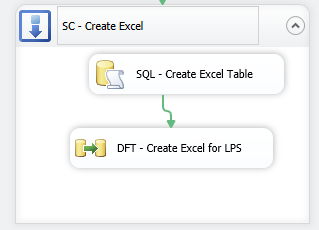
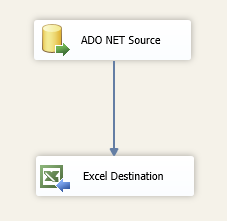
Preview of what's to come from Control Flow view:


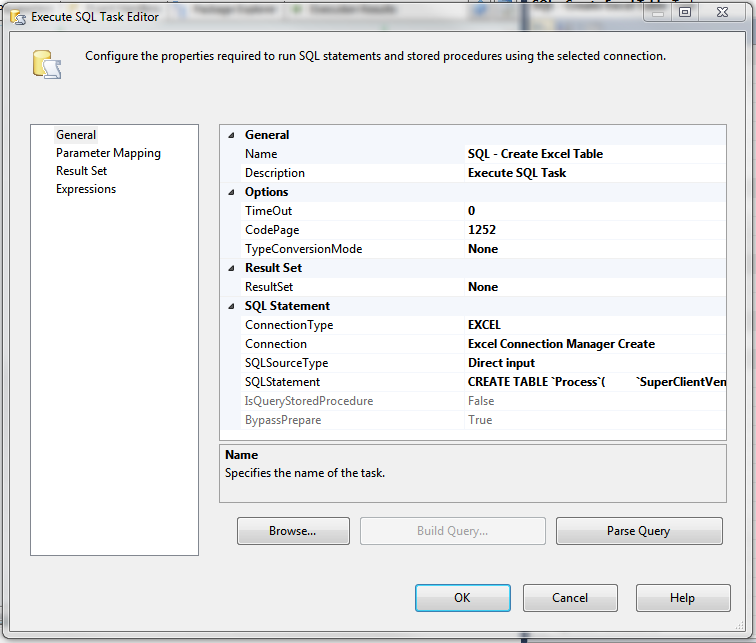
You're going to need to first create a Execute SQL Task, because this is going to be used to create your sheet in excel. The syntax is similar to SQL Server's Create Table, except that it uses the accent quote `  instead of squaring the names in brackets i.e.: [name]. It also seems to have a problem with numeric and character cell size limits.


In this case, I'm creating an excel sheet called Process:


CREATE TABLE `Process`(
 `SuperClientVendorID` INT,
 `LoanNumber` varchar(25),
 `OpenIndicator` char(3),
 `CloseIndicator` char(3),
 `UpdateIndicator` char(3),
 `ParentRefID` INT,
 `Open_RailDescription` varchar(200),
 `AssignedVendorID` INT ,
 `CloseReason` varchar(200) ,
 `RefID` numeric(18, 0),
 `CloseDate` date ,
 `InheritedAttribute` varchar(3) ,
 `ProcessorCd` varchar(50) ,
 `ProcessStartDate` date ,
 `ReOpenIndicator` varchar(3) ,
 `NoteType` varchar(255) ,
 `Note` text
)

Now, lets create a Excel Connection Manager to dynamically create our file. You're going to need a dummy file to initially create an connection instance. In this dummy file, I had my first rows of names, but I'm not sure if this is really needed.

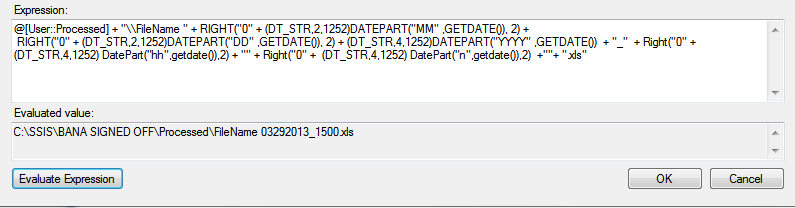
 You're going to point the connection to the excel file for now. Right click on the newly created connection and select properties. In this window, under expressions you're going to create a ExcelFilePath expression:


My text, I use a variable called Processed to represent the file path and folder. I then add a datetime string to the end of the file.

@[User::Processed] + "\\FileName " + RIGHT("0" + (DT_STR,2,1252)DATEPART("MM" ,GETDATE()), 2) +
 RIGHT("0" + (DT_STR,2,1252)DATEPART("DD" ,GETDATE()), 2) + (DT_STR,4,1252)DATEPART("YYYY" ,GETDATE())  + "_"  + Right("0" + (DT_STR,4,1252) DatePart("hh",getdate()),2) + "" + Right("0" +  (DT_STR,4,1252) DatePart("n",getdate()),2)  +""+ ".xls"


I had a problem with the connection at this point, I took the ExcelFilePath name from properties and moved my dummy excel there and renamed it. This won't be a problem when it runs, since the name will change given the time. If you need to edit the file, you will need to recreate/rename your dummy file.

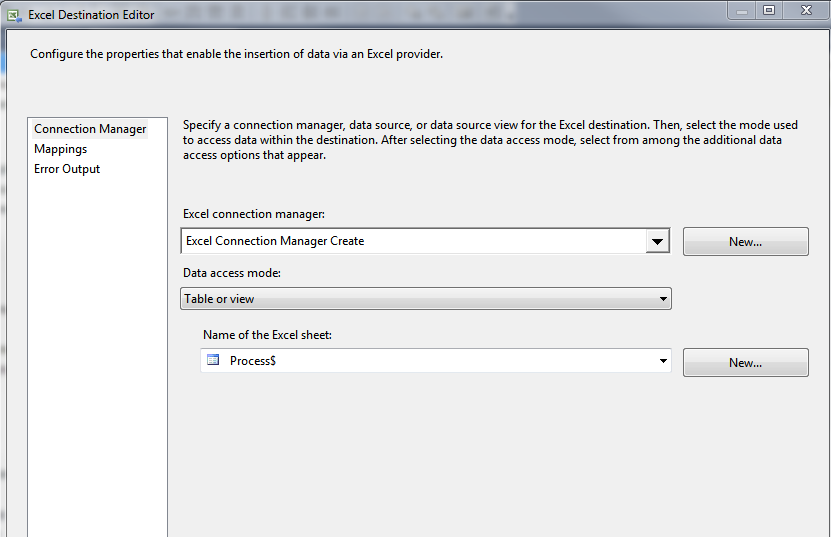
Now create a Data Flow Task and inside that task, create your source file, where you will be pulling the data from. Setup your query to pull the data, etc.... And create your destination excel file.


Point it to your dummy excel file and dummy sheet name.


Run the program, and hope for no errors.


Helpful resources on the same thing:
http://geekepisodes.com/sqlbi/2011/creating-excel-files-xls-dynamically-from-ssis/
http://jandho.blogspot.com/2012/03/ssis-package-to-export-to-new-excel.html

Excel Error in SSIS - 64bit runtime error

Running a very simple SSIS 2012; which pulls data from an excel file. I've done this a million times, but all of a sudden I ran into this tidbit when running on a new machine:

Errors:


  • [Excel Source [39]] Error: SSIS Error Code DTS_E_CANNOTACQUIRECONNECTIONFROMCONNECTIONMANAGER.  The AcquireConnection method call to the connection manager "Excel Connection Manager" failed with error code 0xC0209303.  There may be error messages posted before this with more information on why the AcquireConnection method call failed.
  • [SSIS.Pipeline] Error: Excel Source failed validation and returned error code 0xC020801C.
  • [SSIS.Pipeline] Error: One or more component failed validation.
  • Error: There were errors during task validation.
  • [Connection manager "Excel Connection Manager"] Error: The requested OLE DB provider Microsoft.Jet.OLEDB.4.0 is not registered. If the 64-bit driver is not installed, run the package in 32-bit mode. Error code: 0x00000000.
    An OLE DB record is available.  Source: "Microsoft OLE DB Service Components"  Hresult: 0x80040154  Description: "Class not registered".


On the blogs, people say to download the 64-bit version of the drivers at: http://www.microsoft.com/en-us/download/details.aspx?id=13255
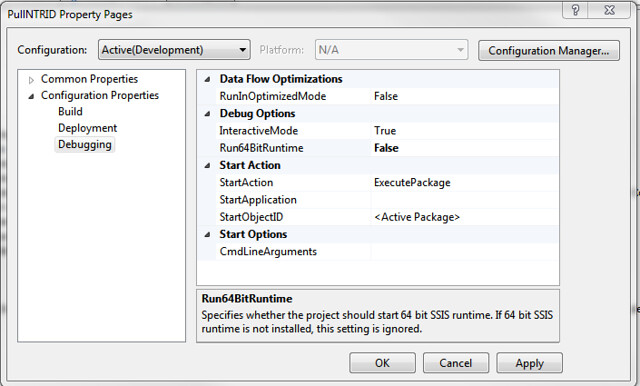
I still had trouble getting it to work, so I changed it to run "not" in 64-bit. Just go to Project/[Name of Project] Properties/Configuration Properties/Debugging under Debug Options and change "Run64BitRuntime" from default value of true to false.


This also means, if you are going to run it in 32-bit, you also have to tell the SQL Agent to run in 32-bit as well. Edit your job and then edit the right job step. Go to the Execution Options pane and check "Use 32 bit runtime". This property will only effect the package (+child packages) called in this job step.

Monday, July 09, 2012

SQL-Server Query to get blocking information

A useful query to get the blocking information within SQL-Server:

SELECT
tr1.resource_type,
tr1.resource_subtype,
tr1.resource_database_id,
tr1.resource_associated_entity_id,
tr1.request_mode,
tr1.request_type,
tr1.request_status,
tr1.request_session_id,
tr1.request_owner_type,
tr2.blocking_session_id
FROM sys.dm_tran_locks as tr1
INNER JOIN sys.dm_os_waiting_tasks as tr2 ON tr1.lock_owner_address = tr2.resource_address;

-Source: Microsoft SQL Server 2012 - Pocket Consultant by William R. Stanek