About Me

My photo
Northglenn, Colorado, United States
I'm primarily a BI Developer on the Microsoft stack. I do sometimes touch upon other Microsoft stacks ( web development, application development, and sql server development).
Showing posts with label export. Show all posts

Thursday, June 02, 2016

0.00000000000 as Text Error when exporting to Excel from SSRS.


Just a quick tip/fix for this problem. When exporting a report to excel, sometimes you'll end up getting a long text version of the number zero instead of the actual number -- causing issue and/or time correcting the issue for users.

The fix is simple, in this case, I just cast the numbers as decimal in my query forcing it to treat it as such.  (ex:  CAST(PCT AS DECIMAL) AS PCT  )


Wednesday, August 05, 2015

Running specialized CSV in SSRS with different device settings.

So this will be useful if you want to change the default settings for a single report, and not all reports, that are exported to CSV. An example, making semi-colon or tab delimited values.

A good read on bypassing the "CSV Device Information Settings" used on the reporting server.

http://blogs.infosupport.com/modify-reporting-services-export-to-csv-behavior/

Here are a list of the settings that can be changed in the url:
https://msdn.microsoft.com/en-us/library/ms155365%28v=sql.105%29.aspx


So instead of using the standard user-friendly interface, you will be using the file system interface, found in /ReportServer/Pages/ReportViewer.aspx?

and adding on your commands, just like you would do with parameters, to override the settings:

 &rs:Command=Render&rs:Format=CSV&rc:ExcelMode=true&rc:Qualifier=%22&rc:NoHeader=false&rc:FieldDelimiter=, 

Note:
This however, still leaves the problem with the qualifier. I was told that a csv file being sent to a third-party had to have quotation marks around each value (e.g. "First Name"). This doesn't seem possible in SSRS. The qualifier will only put quotes around a field if there was already a quote in the value (e.g. William "Big Bill" Andrus => "William "Big Bill" Andrus") which would also give incorrect usage of quotes if you hard code them (e.g. "First Name" => ""First Name""). And, there seems to be no way to force the qualifier to display. 

Tuesday, October 21, 2014

Optimizing SSRS Rendering and Performance

I often run into the situation of SSRS taking too long to render or a long delay before processing starts. Here are 3 links provided by Microsoft that might help in solving those inefficiencies.

Troubleshooting Reports: Report Performance

http://msdn.microsoft.com/en-us/library/bb522806.aspx  


Exporting Reports

 http://msdn.microsoft.com/en-us/library/ms157153.aspx


Understanding Rendering Behaviors

http://msdn.microsoft.com/en-us/library/bb677573.aspx


Friday, March 29, 2013

Exporting to Excel in SSIS

How to export data to excel. I did follow other blogs, but they leave out vital information to get it working, so here is my attempt.
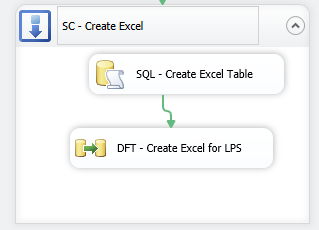
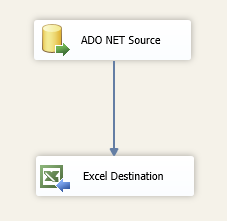
Preview of what's to come from Control Flow view:


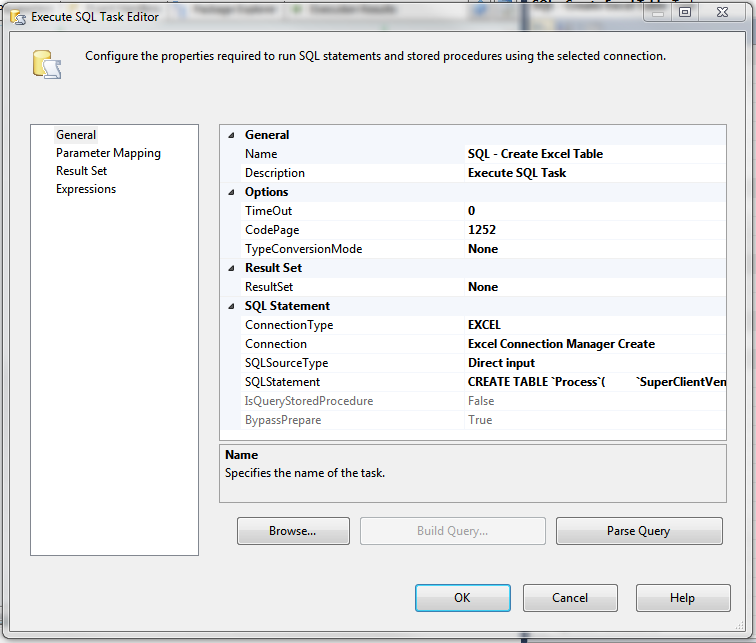
You're going to need to first create a Execute SQL Task, because this is going to be used to create your sheet in excel. The syntax is similar to SQL Server's Create Table, except that it uses the accent quote `  instead of squaring the names in brackets i.e.: [name]. It also seems to have a problem with numeric and character cell size limits.


In this case, I'm creating an excel sheet called Process:


CREATE TABLE `Process`(
 `SuperClientVendorID` INT,
 `LoanNumber` varchar(25),
 `OpenIndicator` char(3),
 `CloseIndicator` char(3),
 `UpdateIndicator` char(3),
 `ParentRefID` INT,
 `Open_RailDescription` varchar(200),
 `AssignedVendorID` INT ,
 `CloseReason` varchar(200) ,
 `RefID` numeric(18, 0),
 `CloseDate` date ,
 `InheritedAttribute` varchar(3) ,
 `ProcessorCd` varchar(50) ,
 `ProcessStartDate` date ,
 `ReOpenIndicator` varchar(3) ,
 `NoteType` varchar(255) ,
 `Note` text
)

Now, lets create a Excel Connection Manager to dynamically create our file. You're going to need a dummy file to initially create an connection instance. In this dummy file, I had my first rows of names, but I'm not sure if this is really needed.

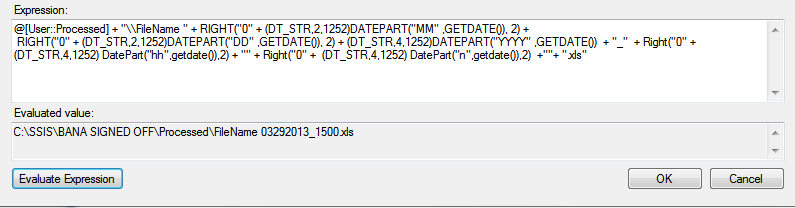
 You're going to point the connection to the excel file for now. Right click on the newly created connection and select properties. In this window, under expressions you're going to create a ExcelFilePath expression:


My text, I use a variable called Processed to represent the file path and folder. I then add a datetime string to the end of the file.

@[User::Processed] + "\\FileName " + RIGHT("0" + (DT_STR,2,1252)DATEPART("MM" ,GETDATE()), 2) +
 RIGHT("0" + (DT_STR,2,1252)DATEPART("DD" ,GETDATE()), 2) + (DT_STR,4,1252)DATEPART("YYYY" ,GETDATE())  + "_"  + Right("0" + (DT_STR,4,1252) DatePart("hh",getdate()),2) + "" + Right("0" +  (DT_STR,4,1252) DatePart("n",getdate()),2)  +""+ ".xls"


I had a problem with the connection at this point, I took the ExcelFilePath name from properties and moved my dummy excel there and renamed it. This won't be a problem when it runs, since the name will change given the time. If you need to edit the file, you will need to recreate/rename your dummy file.

Now create a Data Flow Task and inside that task, create your source file, where you will be pulling the data from. Setup your query to pull the data, etc.... And create your destination excel file.


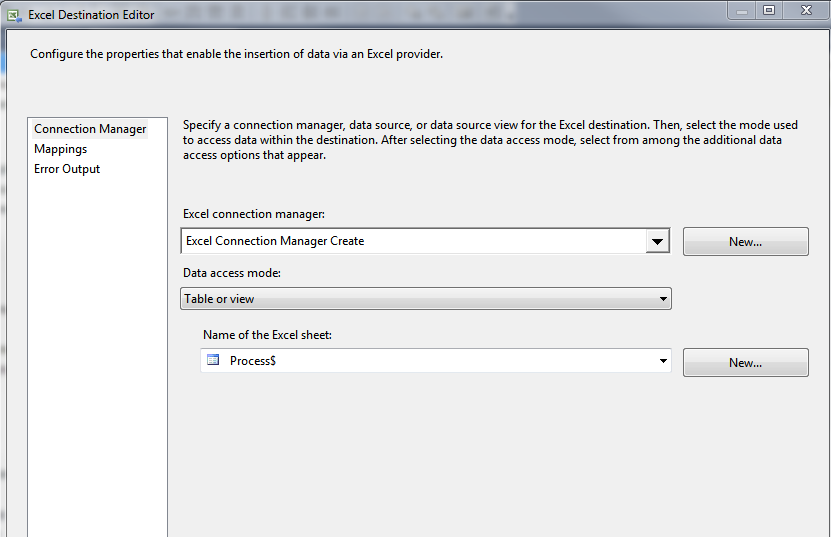
Point it to your dummy excel file and dummy sheet name.


Run the program, and hope for no errors.


Helpful resources on the same thing:
http://geekepisodes.com/sqlbi/2011/creating-excel-files-xls-dynamically-from-ssis/
http://jandho.blogspot.com/2012/03/ssis-package-to-export-to-new-excel.html

Tuesday, July 01, 2008

Bulk Export from SQL Server into a CSV file

Well, here is a simple query/stored procedure that you can run to bulk export the tables in a database into a csv file.

Just change the “databaseName” in the file to the one you want to point to and also change the location if you wish. Currently it is the C:\ drive.


DECLARE @var nvarchar(MAX)

DECLARE curRunning
CURSOR LOCAL FAST_FORWARD FOR
select name from sysobjects where type = 'U'

Open curRunning

Fetch NEXT From curRunning into @var

WHILE @@FETCH_STATUS = 0
BEGIN
    --select 'exec master.dbo.xp_cmdshell ''bcp databaseName.dbo.' + @var + ' out C:\' + @var + '.csv -c -T -t ,'''
    DECLARE @Exec nvarchar(MAX)
    set @Exec = 'exec master.dbo.xp_cmdshell ''bcp databaseName.dbo.' + @var + ' out C:\' + @var + '.csv -c -T -t ,'''
    execute sp_executesql @Exec
FETCH NEXT FROM curRunning into @var
END

close curRunning
DEALLOCATE curRunning