About Me

My photo
Northglenn, Colorado, United States
I'm primarily a BI Developer on the Microsoft stack. I do sometimes touch upon other Microsoft stacks ( web development, application development, and sql server development).

Thursday, February 21, 2013

Design Smarter Indexes

A helpful script for investigating indexes, thanks to Brent Ozar Unlimited.

Code Snippet
  1. /**********************
  2. This is a demo script from http://brentozar.com
  3. Scripts provided for testing/demo purposes only.
  4. This work is licensed under a Creative Commons Attribution-NonCommercial-ShareAlike 3.0 Unported License.
  5. http://creativecommons.org/licenses/by-nc-sa/3.0/
  6. ***********************/
  7.  
  8. /**********************
  9. 0. Preliminary Check
  10. How long has our instance been up?
  11. We want to know to contextualize the number of times the index was needed.
  12. **********************/
  13. select cast(datediff(hh,sqlserver_start_time,GETDATE())/24.0 as numeric(10,1)) as [Days Uptime]
  14. from sys.dm_os_sys_info
  15.  
  16. --What does this mean for missing index data?
  17. /**********************
  18. 1. Review missing indexes.
  19. Let's create a view to look at them.
  20. ***********************/
  21. if object_id('dbo.MissingIndexes') is null
  22.    exec sp_executesql N'create view dbo.MissingIndexes as select ''''as Stub'
  23. GO
  24.  
  25. ALTER VIEW dbo.MissingIndexes
  26. AS
  27. SELECT    id.statement,
  28.         cast(gs.avg_total_user_cost * gs.avg_user_impact * ( gs.user_seeks + gs.user_scans )as int) AS Impact,
  29.         cast(gs.avg_total_user_cost as numeric(10,2)) as [Average Total Cost],
  30.         cast(gs.avg_user_impact as int) as [% Reduction of Cost],
  31.         gs.user_seeks + gs.user_scans as [Missed Opportunities],
  32.         id.equality_columns as [Equality Columns],
  33.         id.inequality_columns as [Inequality Columns],
  34.         id.included_columns as [Included Columns]
  35.         FROM sys.dm_db_missing_index_group_stats AS gs
  36.         JOIN sys.dm_db_missing_index_groups AS ig ON gs.group_handle = ig.index_group_handle
  37.         JOIN sys.dm_db_missing_index_details AS id ON ig.index_handle = id.index_handle
  38. GO
  39.  
  40. --Check out your view
  41. SELECT * FROM dbo.MissingIndexes
  42. ORDER BY Impact desc
  43.  
  44. /**********************
  45. 2. Make a list of the columns which look interesting
  46. ***********************/
  47. /**********************
  48. 3. Review indexes already on the table.
  49. This will give you a sense of the current 'weight' of indexes for the table.
  50. Look at urgent impact values of 1,000,000+
  51. Investigate impact values of 20,000+
  52. ***********************/
  53. SELECT    OBJECT_NAME(ps.object_id) AS object_name,
  54.         ps.index_id,
  55.         ISNULL(si.name, '(heap)') AS index_name,
  56.         CAST(ps.reserved_page_count * 8 / 1024.0 / 1024.0 AS NUMERIC(10, 2)) AS reserved_GB,
  57.         ps.row_count,
  58.         ps.partition_number,
  59.         ps.in_row_reserved_page_count,
  60.         ps.lob_reserved_page_count,
  61.         ps.row_overflow_reserved_page_count
  62. FROM
  63. sys.dm_db_partition_stats ps
  64. LEFT JOIN sys.indexes AS si ON ps.object_id = si.object_id AND ps.index_id = si.index_id
  65. WHERE
  66. OBJECT_NAME(ps.object_id) = 'ENTER_DATABASE_NAME_HERE'
  67.  
  68. --Check for indexes already on the table which may combine with your desired index.
  69. --For example, there may be an existing index which you can add key columns or includes to,
  70. --That's always better than creating a new index!
  71. --What is our table keyed on?
  72. exec sp_helpindex [ENTER_DATABASE_NAME_HERE]
  73. /**********************
  74. 4. Create an index - if needed
  75. ***********************/
  76.  
  77. --What did this do to our missing index recommendations?
  78. SELECT *
  79. FROM dbo.MissingIndexes
  80. ORDER BY Impact desc
  81. --Wait for some time to pass...
  82. --Queries are running marathons, taking long walks on beaches, and enjoying the sunset.
  83. /**********************
  84. 5. Review index usage
  85. ***********************/
  86. SELECT    o.name as [Object Name],
  87.         s.index_id as [Index ID],
  88.         ps.partition_number as [Partition Num],
  89.         i.name as [Index Name],
  90.         i.type_desc as [Index Type],
  91.         s.user_seeks + s.user_scans + s.user_lookups as [Total Queries Which Read],
  92.         s.user_updates [Total Queries Which Wrote],
  93.         ps.row_count as [Row Count],
  94.         CASE WHEN s.user_updates < 1 THEN 100
  95.              ELSE ( s.user_seeks + s.user_scans + s.user_lookups ) / s.user_updates * 1.0
  96.         END AS [Reads Per Write]
  97. FROM
  98. sys.dm_db_index_usage_stats s
  99. JOIN sys.dm_db_partition_stats ps on s.object_id=ps.object_id and s.index_id=ps.index_id
  100. JOIN sys.indexes i ON i.index_id = s.index_id AND s.object_id = i.object_id
  101. JOIN sys.objects o ON s.object_id = o.object_id
  102. JOIN sys.schemas c ON o.schema_id = c.schema_id
  103. WHERE
  104. s.database_id=db_id()
  105. and o.name = 'ENTER_DATABASE_NAME_HERE'
  106.  
  107. /**********************
  108. 6. Do we still have missing indexes?
  109. **********************/
  110. SELECT *
  111. FROM dbo.MissingIndexes
  112. ORDER BY Impact desc

 -Source: http://www.brentozar.com/archive/2011/09/kendra-little-explains-how-design-smarter-indexes/


 

Friday, February 08, 2013

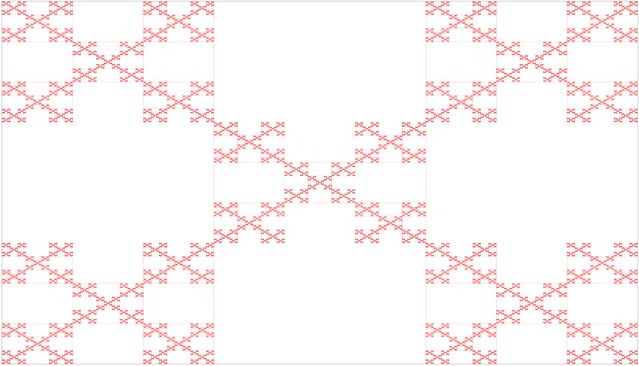
Box Fractal written in Javascript


Code Snippet
  1. <!DOCTYPE html>
  2. <html>
  3. <head>
  4.     <meta charset="utf-8" />
  5.     <meta name="viewport" content="width=device-width" />
  6.     <title>Box Fractal</title>
  7.     <link href="/Content/site.css" rel="stylesheet"/>
  8.  
  9.     <script src="/Scripts/modernizr-2.5.3.js"></script>
  10.     
  11.     <script src="/Scripts/jquery-1.7.1.js"></script>
  12.  
  13.     
  14. </head>
  15. <body>
  16.     
  17.  
  18. <h2>Box Fractal</h2>
  19.  
  20. <canvas id="myCanvas" width="1600px" height="1200px"  style="border:1px solid #d3d3d3;">
  21. Your browser does not support the HTML5 canvas tag.
  22. </canvas>
  23.  
  24. <script type="text/javascript">
  25.     function Point(X,Y) {
  26.         this.X = X;
  27.         this.Y = Y;
  28.     };
  29.  
  30.     function resizeFrame() {
  31.         var h = $(window).height();
  32.         var w = $(window).width();
  33.         $("#myCanvas").css('height', h - 100);
  34.         $("#myCanvas").css('width', w - 50);
  35.     }
  36.  
  37.     function canvas() {
  38.         this.height = $(window).height();
  39.         this.width = $(window).width();
  40.     }
  41.  
  42.     $(document).ready(function () {
  43.         jQuery.event.add(window, "load", resizeFrame);
  44.         jQuery.event.add(window, "resize", resizeFrame);
  45.  
  46.         var color = "red";
  47.         var backgroundColor = "white";
  48.         var lineWidth = 1;
  49.         var precision = 1;
  50.         var third = 0.333333;
  51.  
  52.         var g = document.getElementById("myCanvas");
  53.         var ctx = g.getContext("2d");
  54.         width = g.width;
  55.         height = g.height;
  56.         ctx.fillStyle = color;
  57.         ctx.lineWidth = lineWidth;
  58.  
  59.         //ctx.beginPath();
  60.         draw(width, height);
  61.         //ctx.stroke();
  62.  
  63.         function draw(width, height) {
  64.             //Draw initial block
  65.             var upperLeft = new Point(0, 0);
  66.             ctx.fillRect(upperLeft.X, upperLeft.Y, width, height);
  67.  
  68.             ctx.fillStyle = backgroundColor;
  69.             drawBox(upperLeft, width, height);
  70.         }
  71.  
  72.         function drawBox(upperLeft, width, height) {
  73.             if (width * third > precision) {
  74.                 var top = new Point(upperLeft.X + width * third, upperLeft.Y);
  75.                 var left = new Point(upperLeft.X, upperLeft.Y + height * third);
  76.                 var right = new Point(upperLeft.X + 2 * width * third, upperLeft.Y + height * third);
  77.                 var bottom = new Point(upperLeft.X + width * third, upperLeft.Y + 2 * height * third);
  78.  
  79.                 //Remove 4 squares
  80.                 ctx.fillRect(top.X, top.Y, width * third, height * third);
  81.                 ctx.fillRect(left.X, left.Y, width * third, height * third);
  82.                 ctx.fillRect(right.X, right.Y, width * third, height * third);
  83.                 ctx.fillRect(bottom.X, bottom.Y, width * third, height * third);
  84.  
  85.  
  86.                 //upperleft box
  87.                 drawBox(upperLeft, width * third, height * third);
  88.                 //upperright box
  89.                 drawBox(new Point(upperLeft.X + 2 * width * third, upperLeft.Y), width * third, height * third);
  90.                 //middle box
  91.                 drawBox(new Point(upperLeft.X + width * third, upperLeft.Y + height * third), width * third, height * third);
  92.                 //lowerleft box
  93.                 drawBox(new Point(upperLeft.X, upperLeft.Y + 2 * height * third), width * third, height * third);
  94.                 //lowerright box
  95.                 drawBox(new Point(upperLeft.X + 2 * width * third, upperLeft.Y + 2 * height * third), width * third, height * third);
  96.  
  97.             }
  98.         }
  99.     });
  100.  
  101. </script>
  102. </body>
  103. </html>

Monday, February 04, 2013

A couple of Linq to Sql Query Examples


Just a quick reference of a couple basic query conversions for Linq to SQL


Code Snippet
  1. //inner join
  2.             //SELECT [t0].[CountyName]
  3.             //FROM [dbo].[County] AS [t0]
  4.             //INNER JOIN [dbo].[State] AS [t1] ON [t0].[StateID] = [t1].[StateID]
  5.             //WHERE LOWER([t1].[StateName]) = @p0
  6.             var counties =  from c in db.Counties
  7.                             join st in db.States on c.StateID equals st.StateID
  8.                             where st.StateName.ToLower().Equals("florida")
  9.                             select c.CountyName;
  10.  
  11.  
  12.             //left join -- use DefaultIfEmpty and new object
  13.             //SELECT [t0].[CountyName],
  14.             //(CASE WHEN [t2].[test] IS NULL THEN CONVERT(NVarChar(50),@p0)
  15.             //      ELSE CONVERT(NVarChar(50),[t2].[StateName])
  16.             //      END) AS [StateName]
  17.             //FROM [dbo].[County] AS [t0]
  18.             //LEFT OUTER JOIN
  19.             //(
  20.             //      SELECT 1 AS [test], [t1].[StateID], [t1].[StateName]
  21.             //      FROM [dbo].[State] AS [t1]
  22.             //) AS [t2] ON [t0].[StateID] = [t2].[StateID]
  23.             var counties2 = from c in db.Counties
  24.                             join st in db.States on c.StateID equals st.StateID
  25.                             into stateCounties
  26.                             from co in stateCounties.DefaultIfEmpty()
  27.                             select new { CountyName = c.CountyName, StateName = (co == null)? "": co.StateName };
  28.  
  29.  
  30.             //Same table query
  31.             //SELECT [t0].[CountyName]
  32.             //FROM [dbo].[County] AS [t0],
  33.             //     [dbo].[County] AS [t1]
  34.             //WHERE ([t0].[CountyName] = [t1].[CountyName]) AND ([t0].[CountyID] <> [t1].[CountyID])
  35.             var counties3 = from c1 in db.Counties
  36.                             from c2 in db.Counties
  37.                             where c1.CountyName == c2.CountyName && c1.CountyID != c2.CountyID
  38.                             select new
  39.                             {
  40.                                 CountyName = c1.CountyName,
  41.                             };
  42.  
  43.  
  44.  
  45.  
  46.             var counties4 = (from c1 in db.Counties
  47.                             from c2 in db.Counties
  48.                             where c1.CountyName == c2.CountyName && c1.CountyID != c2.CountyID
  49.                             group c1 by c1.CountyName into dups
  50.                             select new
  51.                             {
  52.                                 CountyName = dups.Key,
  53.                                 Count = dups.Count()
  54.                             }
  55.                             ).OrderBy(n => n.CountyName);

Some resources I found useful:
http://codesamplez.com/database/linq-to-sql-join-tutorials
http://weblogs.asp.net/rajbk/archive/2010/03/12/joins-in-linq-to-sql.aspx

http://msdn.microsoft.com/en-us/library/bb386913.aspx
   More specifically to joins:
   http://msdn.microsoft.com/en-us/library/bb399397.aspx

Friday, February 01, 2013

Sierpinski's Triangle written in Javascript


Code Snippet
  1. <!DOCTYPE html>
  2. <html>
  3. <head>
  4.     <meta charset="utf-8" />
  5.     <meta name="viewport" content="width=device-width" />
  6.     <title>Sierpinski Triangle</title>
  7.     <link href="/Content/site.css" rel="stylesheet"/>
  8.  
  9.     <script src="/Scripts/modernizr-2.5.3.js"></script>
  10.     
  11.     <script src="/Scripts/jquery-1.7.1.js"></script>
  12.  
  13.     
  14. </head>
  15. <body>
  16.     
  17. <h2>Sierpinski Triangle</h2>
  18. <canvas id="myCanvas" width="1600px" height="1200px"  style="border:1px solid #d3d3d3;">
  19. Your browser does not support the HTML5 canvas tag.
  20. </canvas>
  21.  
  22. <script type="text/javascript">
  23.  
  24.     function Point(X,Y) {
  25.         this.X = X;
  26.         this.Y = Y;
  27.     };
  28.  
  29.     function resizeFrame() {
  30.         var h = $(window).height();
  31.         var w = $(window).width();
  32.         $("#myCanvas").css('height', h - 100);
  33.         $("#myCanvas").css('width', w - 50);
  34.     }
  35.  
  36.     function canvas() {
  37.         this.height = $(window).height();
  38.         this.width = $(window).width();
  39.     }
  40.  
  41.     $(document).ready(function () {
  42.         jQuery.event.add(window, "load", resizeFrame);
  43.         jQuery.event.add(window, "resize", resizeFrame);
  44.  
  45.         var color = "red";
  46.         var backgroundColor = "white";
  47.         var lineWidth = 1;
  48.         var precision = 1; //30,10,8
  49.         //var canvasDim = new canvas();
  50.  
  51.         var g = document.getElementById("myCanvas");
  52.         var ctx = g.getContext("2d");
  53.         width = g.width;
  54.         height = g.height;
  55.         ctx.fillStyle = backgroundColor;
  56.         ctx.fillRect(0, 0, width, height);
  57.         ctx.strokeStyle = color;
  58.         ctx.lineWidth = lineWidth;
  59.  
  60.         ctx.beginPath();
  61.         draw(width, height);
  62.         ctx.stroke();
  63.  
  64.  
  65.         function drawLine(pt1, pt2) {
  66.             ctx.moveTo(pt1.X, pt1.Y);
  67.             ctx.lineTo(pt2.X, pt2.Y);
  68.             //requestAnimationFrame(render);
  69.         }
  70.  
  71.         function draw(width, height) {
  72.             //Draw initial outer triangle
  73.             var top = new Point(width >> 1, 0);
  74.             var bottomLeft = new Point(0, height);
  75.             var bottomRight = new Point(width, height);
  76.  
  77.             drawLine(top, bottomLeft);
  78.             drawLine(bottomLeft, bottomRight);
  79.             drawLine(bottomRight, top);
  80.  
  81.             drawSierp(top, bottomLeft, bottomRight);
  82.         }
  83.  
  84.         function drawSierp(a, b, c) {
  85.             if ((a.X - b.X) > precision) {
  86.                 drawLine(a, b);
  87.                 drawLine(b, c);
  88.                 drawLine(c, a);
  89.                 drawLine(a, new Point((a.X + b.X) >> 1, (a.Y + b.Y) >> 1));
  90.                 drawLine(b, new Point((a.X + b.X) >> 1, (a.Y + b.Y) >> 1));
  91.                 drawLine(c, new Point((b.X + c.X) >> 1, (b.Y + c.Y) >> 1));
  92.                 drawLine(a, new Point((c.X + a.X) >> 1, (c.Y + a.Y) >> 1));
  93.                 drawLine(b, new Point((b.X + c.X) >> 1, (b.Y + c.Y) >> 1));
  94.                 drawLine(c, new Point((c.X + a.X) >> 1, (c.Y + a.Y) >> 1));
  95.  
  96.                 drawSierp(a, new Point((a.X + b.X) >> 1, (a.Y + b.Y) >> 1), new Point((c.X + a.X) >> 1, (c.Y + a.Y) >> 1));
  97.                 drawSierp(new Point((a.X + b.X) >> 1, (a.Y + b.Y) >> 1), b, new Point((b.X + c.X) >> 1, (b.Y + c.Y) >> 1));
  98.                 drawSierp(new Point((c.X + a.X) >> 1, (c.Y + a.Y) >> 1), new Point((b.X + c.X) >> 1, (b.Y + c.Y) >> 1), c);
  99.             }
  100.         }
  101.  
  102.     });
  103. </script>
  104. </body>
  105. </html>

Thursday, January 31, 2013

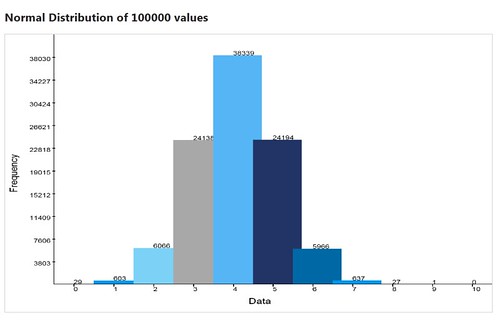
Graph written in javascript of a Normal Distribution Random Number Gen.


Code Snippet
  1. <!DOCTYPE html>
  2. <html>
  3. <head>
  4.     <meta charset="utf-8" />
  5.     <meta name="viewport" content="width=device-width" />
  6.     <title>Normal Distribution</title>
  7.     <link href="/Content/site.css" rel="stylesheet"/>
  8.  
  9.     <script src="/Scripts/modernizr-2.5.3.js"></script>
  10.  
  11.     <script src="/Scripts/jquery-1.7.1.js"></script>
  12.  
  13.     
  14. </head>
  15. <body>
  16.     
  17.  
  18. <h2 id="header" class="header">Normal Distribution</h2>
  19.  
  20. <canvas id="myCanvas" width="1600px" height="1200px" style="border: 1px solid #d3d3d3;">Your browser does not support the HTML5 canvas tag.
  21. </canvas>
  22.  
  23. <script type="text/javascript">
  24.     function Point(X, Y) {this.X = X;this.Y = Y;};
  25.     function resizeFrame() {var h = $(window).height();var w = $(window).width();$("#myCanvas").css('height', h - 100); $("#myCanvas").css('width', w - 50);}
  26.     function canvas() {this.height = $(window).height();this.width = $(window).width();}
  27.  
  28.     $(document).ready(function () {
  29.         jQuery.event.add(window, "load", resizeFrame);
  30.         jQuery.event.add(window, "resize", resizeFrame);
  31.     });
  32.  
  33.     var min,max,headSpace;
  34.     var size = 100000;
  35.     var density = [];
  36.     var dcount = 0;
  37.     var normalValues = [];
  38.     var dmin = 9007199254740992;
  39.     var dmax = 0;
  40.     var colors = ['#0069a5', '#0098ee', '#7bd2f6', '#a8a8a8', '#55b5f5', '#223366'];
  41.     var g = document.getElementById("myCanvas");
  42.     var ctx = g.getContext("2d");
  43.     var notchColor = 'black';
  44.     var textColor = 'black';
  45.     var fontFamily = 'Arial';
  46.     var labelFontSize = 35;
  47.     var dataFontSize = 25;
  48.     var width = g.width;
  49.     var height = g.height;
  50.     var barLeft = width *.10;
  51.     var barBottom = height * .90;
  52.  
  53.     draw();
  54.  
  55.     ctx.strokeStyle = textColor;
  56.     ctx.lineWidth = 2;
  57.     ctx.beginPath();
  58.     drawGraph();
  59.     ctx.stroke();
  60.  
  61.     function drawLine(pt1, pt2) {
  62.         ctx.moveTo(pt1.X, pt1.Y);
  63.         ctx.lineTo(pt2.X, pt2.Y);
  64.     }
  65.  
  66.     function drawGraph() {
  67.         $('#header').text('Normal Distribution of ' + size.toString() + ' values');
  68.         ctx.font = labelFontSize.toString() + "px " + fontFamily;
  69.         var data = "Data";
  70.         ctx.fillText(data, width >> 1, height - labelFontSize.toString());
  71.  
  72.         //rotate ctx to draw text vertically then restore back to norm
  73.         var freq = "Frequency";
  74.         ctx.save();
  75.         ctx.rotate(-Math.PI / 2);
  76.         ctx.textAlign = "center";
  77.         ctx.fillText(freq, -1 * (height >> 1), barLeft >> 2);
  78.         ctx.restore();
  79.  
  80.         //draw horizontal bar   
  81.         var pt1 = new Point(barLeft, barBottom);
  82.         var pt2 = new Point(width, barBottom);
  83.         drawLine(pt1, pt2);
  84.  
  85.         //draw vertical bar
  86.         var pt3 = new Point(barLeft, 0);
  87.         var pt4 = new Point(barLeft, barBottom);
  88.         drawLine(pt3, pt4);
  89.  
  90.         var startValue = 0;
  91.         var partitions = density.length;  //(Math.ceil((dmax - dmin) / barBottom));
  92.         var increment = Math.ceil((dmax - dmin) / partitions);
  93.  
  94.         ctx.font = dataFontSize.toString() + "px " + fontFamily;
  95.         ctx.fillStyle = textColor;
  96.         //Draw vertical markers
  97.         for (var i = startValue + increment; i <= dmax; i = i + increment) {
  98.             var iString = i.toString(); //.substr(0, sigFig);
  99.             var marker = barBottom * ((dmax - i) / dmax);
  100.             ctx.fillRect(barLeft - 5, marker, 10, 3); //draw bar
  101.             ctx.fillText(iString, barLeft - ctx.measureText(iString).width - 10, marker + (labelFontSize>>1)); //draw text
  102.         }
  103.     }
  104.  
  105.     function draw() {
  106.         randomize();
  107.         sort();
  108.  
  109.         dmax = dmax +  Math.ceil((dmax - dmin) / density.length);//give some head space at top of chart
  110.  
  111.         var xPartitions = ((width - barLeft) / density.length);
  112.         var colorSequence = 0;
  113.         var barHeight;
  114.         var x = barLeft;
  115.         var y = barBottom;
  116.  
  117.         for (var i = 0; i < density.length; i++) {
  118.             barHeight = barBottom - (barBottom * ((dmax - density[i])/dmax));
  119.             y = barBottom - barHeight;
  120.  
  121.             //bar
  122.             ctx.lineWidth = 1;
  123.             ctx.fillStyle = colors[colorSequence];
  124.             ctx.fillRect(x, y, barLeft, barHeight);
  125.  
  126.             //value text
  127.             ctx.font = dataFontSize.toString() + "px " + fontFamily;
  128.             ctx.fillStyle = notchColor;
  129.             ctx.fillText(density[i].toString(), (x + x + xPartitions) >> 1, barBottom - barHeight);
  130.  
  131.             //notches
  132.             ctx.fillStyle = notchColor;
  133.             ctx.fillRect((x + x + xPartitions) >> 1, barBottom, 3, 10);
  134.  
  135.             //x-axis label
  136.             ctx.font = dataFontSize.toString() + "px " + fontFamily;
  137.             ctx.fillText(i.toString(), (x + x + xPartitions) >> 1, barBottom + 30);
  138.  
  139.             x = x + xPartitions;
  140.  
  141.             //color cycle
  142.             if (colorSequence + 1 == colors.length) {colorSequence = 0;}else{colorSequence++;}
  143.         }
  144.     }
  145.  
  146.     function randomize() {
  147.         var x1, x2, w, y1, y2;
  148.         var count = size * .5;
  149.  
  150.         for (var i = 0; i < count; i++) {
  151.             do {
  152.                 x1 = 2 * Math.random() - 1;
  153.                 x2 = 2 * Math.random() - 1;
  154.                 w = x1 * x1 + x2 * x2;
  155.             } while (w >= 1);
  156.  
  157.             w = Math.sqrt((-2 * Math.log(w)) / w);
  158.             y1 = x1 * w;
  159.             y2 = x2 * w;
  160.  
  161.             //This technique generates two numbers at a time, might as well use both
  162.             normalValues[i * 2] = y1;
  163.             normalValues[(i * 2) + 1] = y2;
  164.         }
  165.     }
  166.  
  167.     function sort() {
  168.         var multiplier;
  169.         var blocks = 100;
  170.  
  171.         //find min/max values
  172.         min = normalValues[0];
  173.         max = normalValues[0];
  174.  
  175.         for(var i = 1; i <  normalValues.length; i++){
  176.             if(normalValues[i] < min)
  177.                 min = normalValues[i];
  178.  
  179.             if(normalValues[i] > max)
  180.                 max = normalValues[i];
  181.         }
  182.  
  183.         //create buckets
  184.         var buckets = (Math.round(max) - Math.round(min)) + 1;
  185.         for (var i = 0;  i <= buckets; i++) {
  186.             density[i] = 0;
  187.         }
  188.  
  189.         //sort into buckets
  190.         for (var i = 0; i < normalValues.length; i++){
  191.             //get value
  192.             var val = Math.round(normalValues[i]);
  193.             //find where in bucket it would be placed
  194.             var k = 0;
  195.             
  196.             for(var j = Math.round(min); j <= Math.round(max); j++){
  197.                 if( j == val){
  198.                     density[k] = density[k] + 1;
  199.                     if(dmin > density[k])
  200.                         dmin = density[k];
  201.                     if(dmax < density[k])
  202.                         dmax = density[k];
  203.                     dcount++;
  204.                     break;
  205.                 }
  206.                 k++;
  207.             }
  208.         }  
  209.     }
  210. </script>
  211.  
  212.  
  213. </body>
  214. </html>

Wednesday, January 30, 2013

Quick Note: Resize canvas to browser

Resize canvas to browser's width/height (at least in IE9+), using jQuery:

Code Snippet
  1. <canvas id="myCanvas" width="1600px" height="1200px" style="border: 1px solid #d3d3d3;">Your browser does not support the HTML5 canvas tag.
  2. </canvas>
  3.  
  4. <script type="text/javascript">
  5.     function resizeFrame() {var h = $(window).height();var w = $(window).width();$("#myCanvas").css('height', h - 100); $("#myCanvas").css('width', w - 50);}
  6.  
  7.     $(document).ready(function () {
  8.         jQuery.event.add(window, "load", resizeFrame);
  9.         jQuery.event.add(window, "resize", resizeFrame);
  10.     });
  11.  
  12.     
  13. </script>


Tuesday, January 15, 2013

Quicky: Step through Javascript in Visual Studio

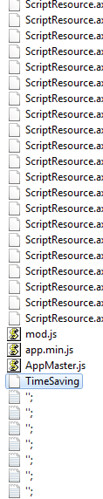
After you hit "F5" (run in debug mode) and get the website running, go the page in question that should be running your javascript. Go back to Visual Studio > Solution Explorer  > Script Documents > Windows Internet Explorer you will see all the scripts that are currently running.


In that section, if you scroll down you should either see the name of the page or default followed by some text (ie: default?dzHbakj3kj09d0dflkjb_lk2j3jlkj)


Open the file and place your breakpoint(s). Allowing you to do quickwatch or to view the data.


Some additional methods on stepping through and debugging Javascript:

  1. If you have VS2012 there is the DOM Explorer: http://msdn.microsoft.com/en-us/library/windows/apps/hh441474.aspx
  2. Using the "debugger" keyword in javascript (http://www.aspsnippets.com/Articles/Debug-JavaScript-and-jQuery-using-Visual-Studio-in-Internet-Explorer-browser.aspx)

JavaScript has a debugger keyword which can appear in JavaScript source. Older JavaScript engines will flag its use as a syntax error (use of a reserved word). But newer engines will allow the keyword. Engine embedders can install a callback hook to be called if and when the keyword is reached during script execution. At some future point there may be a JavaScript Debugger which will install such a hook and pop up a fully featured debugging window when this event fires. For now I have created such a hook in xpconnect which is set in DEBUG builds only. If the debugger keyword is reached then the JavaScript stack will be dumped to the native console (same as if DumpJSStack() had been called.  
After hitting the debugger keword and dumping the JS call stack, JS execution will continue as if nothing unusual had happened. If you would like this to stop in your native debugger then set a breakpoint in xpc_DebuggerKeywordHandler in your native debugger. The debugger statement can be very useful as a kind of super dump as you develop your JavaScript code. You can also use it as a kind of assert: if(some_unusual_condition) debugger;

Note 1) in the example above the test will always happen even though debugger might have no effect in non-DEBUG builds 2) at some future point someone is bound to ship a JavaScript Debugger that will catch these cases (even in non-DEBUG builds). When that happens, users trying to debug their own JS code might trip over your debugger statements. So, while these debugger statements might be very useful as you write code, you may not want to leave them in permanently.  
- Mozilla http://www-archive.mozilla.org/scriptable/javascript-stack-dumper.html


Friday, January 04, 2013

Automatically Attach Process When Debugging in VS

Working with a MVP and MVC and hated that I always had to go to Debug>Attach Process... to step through the MVC side of things. Found on Stack Overflow the solution I needed: http://stackoverflow.com/questions/9030071/visual-studio-2010-automatic-attach-to-process

1) Set project up as multiple startup. Right-click on the solution and select "Set Startup Projects...". In the Action set the projects that is usually the default and the ones you usually need to attach.

2) In the project you usually need to attach, right click the project and go to the properties. Set it to have no startup project or in this case web page. (Web >> Don't Open a page. Wait for a request from an exteran application.